Blogger has been
a right pain in the bum working not very well lately. As if Blogger being down on Thursday 12 and Friday 13 May was not bad enough, users have been experiencing trouble with leaving comments on blogs and even responding to the comments left by others on their blog. Blogger is
aware of it and they're trying to fix it. I hope they're sweating hard to fix it, as the temptation to move to wordpress is getting bigger.
There is another glitch happening at the moment which Blogger has yet to acknowledge and I am left to wonder whether it's meant to be like that from now on: The Google Friend Connect box seems to have disappeared. Whether this is going to be a permanent feature, I don't know but what I do know is that lots of you are quite upset about it.
Personally I couldn't wait to get rid of my Google Friend Connect box: I just hated being judged on the number of Google Friend Connect followers I had. I know that people can still find out how many followers I have but it is not as straightforward as before and I feel happier about it.
My lovely friend Bicky has written a lovely
post about why she
hates is not a fan of that contentious GFC box and thanks to her
video and help on twitter I was able to do an alternative GFC button and still allow new visitors to follow me through Google Friend Connect.
Do you need that Google Friend Connect box anyway? People can still follow you through Google Friend Connect thanks to the navbar at the top, right?
That box is not compulsory for people to be able to follow you. And yes, people can start following your blog using the navbar but not everyone is aware of that bar and what it can do for you. At the end of the day, you need to give people what they want. Getting more readers / followers is hard work and you don't want to put them off because their preferred option of following your blog is not showing. If your readers want to have a button to click on and that is all it takes for them to follow your blog, GIVE THEM A BUTTON. Make it easy for them. Also, some Blogger users may have had their navbar removed for aesthetic purposes, so you can't always rely on that navbar to be there. Sometimes, even when the navbar is on, the 'follow' link is not even there!!! {I am looking at you Internet Explorer}
So how do you get/install/create an alternative Google Friend Connect button?
It's not too much hard work actually and follows a very simple concept:
- Grabbing from the navbar the short line of code which, when clicked on, enables your visitors to follow your blog
- Creating a picture which could say for example 'click here to follow me on Google Friend Connect’
- Creating a widget/gadget where you are going to insert that picture with the 'follow' link. No need to tinker too much with your main template and have great knowledge of html. woop.
Need more help? Read on. The following explains in baby language the 3 steps you need to follow and it is not meant to be patronising.
I'm going to assume you have not removed your navbar. If you have purposefully removed it, I am going to assume that you know what you're doing and that you will remember how to get it back.
 | Grabbing the 'follow' code from your navbar
Sometimes Blogger (on internet explorer) goes off on one and won't display the 'follow' link. You'll have to refresh the page, or log in again, or open your blog with a different browser until you see your navbar display the 'follow' link properly as shown below:

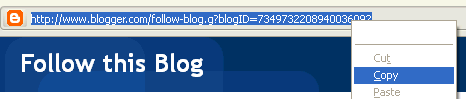
-- Click on FOLLOW. This will in turn display a line of code in the address bar of your browser (at this stage you don't have to follow your blog if you don't want to) we're only doing this to see the line of code.

-- Select that line of code, copy and paste it in a word document or text document (right click on the link to copy the code)
 |
|
|
 | Creating or choosing a picture for your alternative Google Friend Connect button
If you have no skills whatsoever in Photoshop or similar programme, by all means feel free to pinch one of the pictures below, or all of them if you want. Although they are not the nicest pictures. Bicky has done her DIY button to match her template and is just so pretty.


transparent on white background:




transparent on dark background:



You don't have to have that Google logo in there, but the Google logo will make people feel at home and immediately recognise it. If you are going to create a picture, and if you want to put this picture in your sidebar, please make sure that the width of the picture is not bigger than the width of your actual sidebar. If it is blogger will shrink it like a bastard find a way to shrink it no matter what and it will look horrible and you won’t be able to sleep at night.
|
| |
 | Add the widget/gadget
-- Click on design, then page elements, then ADD A GADGET and choose to add the PICTURE gadget.

The rest is pretty self explanatory:
-- Where it says 'link' paste that line of code you retrieved before and pasted into a temporary document
-- Upload your picture (if you choose to use one of my pictures, please be considerate to my bandwidth. Download the picture first, save it on your drive and upload it on your server, thank you)
-- No need to add a title, but if you must, you can type 'follow my blog' with Google Friend Connect or something like that. Click on SAVE and voila. |
Please note this ‘new’ DIY button won't display the number of GFC followers you have. This will be perfect for smaller bloggers who are a bit embarrassed about the number of followers they have. Bloggers with a bigger readership might get upset that they can’t show off their numbers.
If you like this 'tutorial' feel free to share it to your friends, family and pets.
Personally and on a selfish note, I am really happy that the box is gone (I have yet to ascertain whether it’s coming back) and I can’t help myself from being influenced by the number it shows. A low number will make think ‘aww, that little blogger and its 14 followers, bless her little cotton socks’. A high number will make me think ‘
how did she got all of those, I am so crap in comparison wow this blogger is doing really well. And if I think like that, it’s only understandable that *some* beauty companies regrettably and frustratringly might think the same too and approach you or not accordingly.
Do you know what would be funny in an ironic way? That the wretched Google Friend Connect box reappears the minute I publish this post.